
TL;DR
Start with the truck family, power type, and work environment. Record the exact model designation and complete serial number before using a parts diagram or requesting fitment confirmation. A family label alone is not proof that a replacement part fits every unit.
Key Takeaways
- Classify the Toyota truck family before searching a model number.
- Use power type, tire type, and application as clues, not final fitment proof.
- Record the exact model designation and complete serial number.
- Configuration details matter when a lift or attachment part is involved.
- Send buyer identifiers first, then request supplier fitment confirmation.
Table of Contents
- Key Takeaways
- 1. Start with the Toyota equipment family
- 2. Use power source, tires, and work environment as clues
- 3. Read the model designation without overreading it
- 4. Confirm the data plate and complete serial number
- 5. Prepare the information for a parts diagram or inquiry
- Common Toyota model-identification mistakes to avoid
- Conclusion
- References
Toyota forklift models at a glance
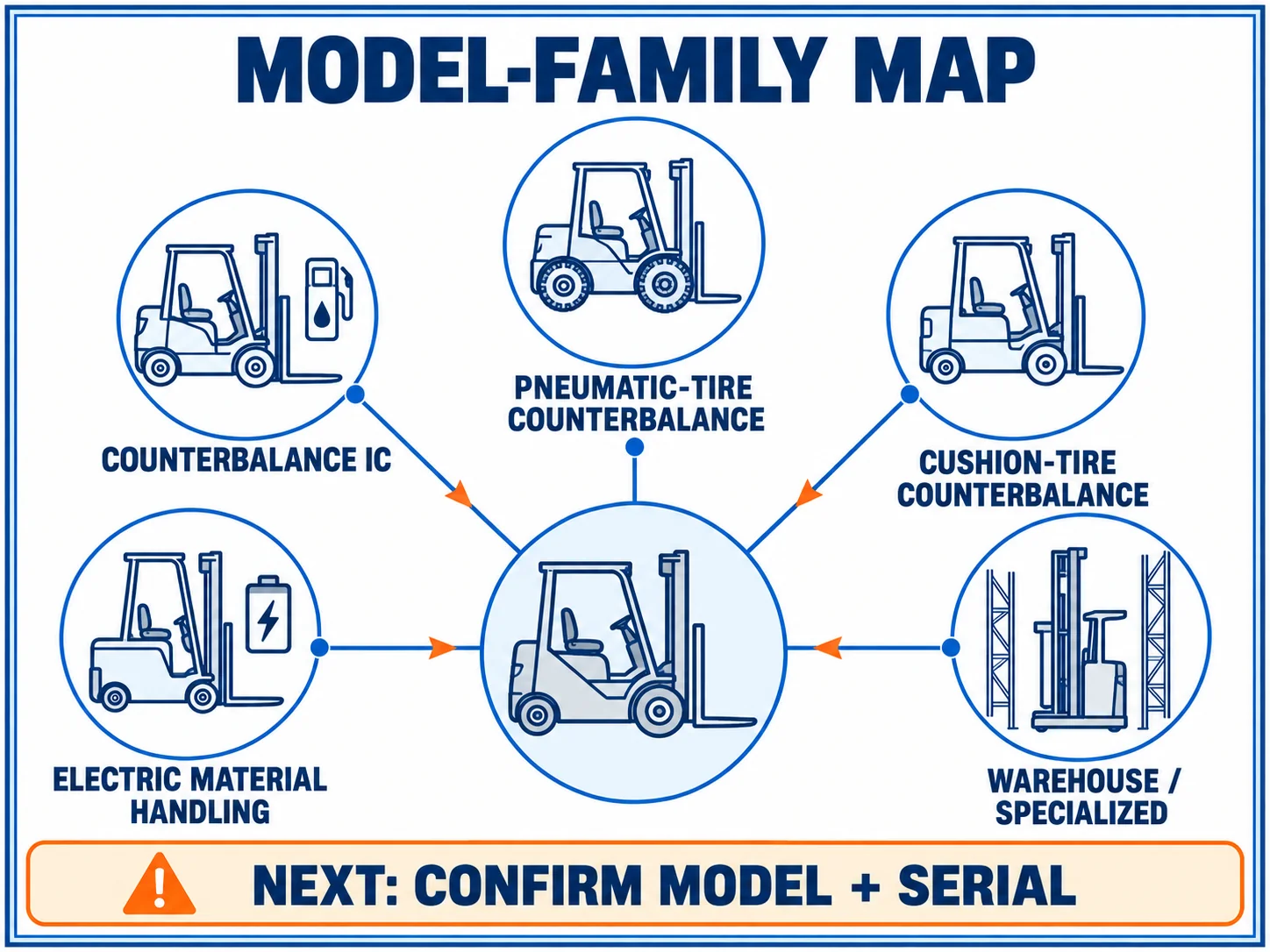
If you do not know which Toyota forklift model family you have, begin with the machine’s job, power source, and tire setup. That first classification narrows the reference path. It does not confirm a replacement part. Record the exact model designation and complete serial number before moving from model research to a parts diagram or supplier review.
| What you can observe | First model-family route | What to confirm next |
|---|---|---|
| Sit-down truck with an internal-combustion power source | Counterbalance IC family | Exact model designation, serial number, and tire or mast configuration |
| Compact sit-down truck used on smooth indoor floors | Cushion-tire counterbalance route | Power type, model plate, serial number, and attachment details |
| Truck used outside or on uneven yards | Pneumatic-tire counterbalance route | Model family, tire setup, mast, and serial number |
| Battery-powered sit-down or stand-up truck | Electric material-handling route | Model designation, battery or drive configuration, and serial number |
| Narrow-aisle, reach, pallet, or stacking equipment | Warehouse or specialized equipment route | Equipment type, data plate, and the component’s own evidence |
The table is a starting index, not a complete Toyota model list. Toyota groups equipment by product family, power source, tire type, and application, while the exact model selection can vary by market and configuration. A model-family label can help you find the right reference branch. It cannot prove that one part fits every unit in that branch.
The 5 starting routes above are filters, not 5 fixed Toyota product lines for every market.
Toyota Forklifts organizes its current product discovery around equipment families and attributes such as power source, tire arrangement, and application. The 5 starting routes in this table are therefore filters for choosing a reference path, not a universal compatibility list. Toyota’s model pages still require unit-level identifiers before a parts decision.
Stop and check: If the only information available is “Toyota forklift” or a capacity label, the identification is not complete. Treat it as a research lead, not as a part-selection result.
The useful sequence is simple: classify the family, read the model designation, capture the complete serial number, then record any configuration that touches the requested component. The next sections explain each step without turning broad family clues into a universal compatibility promise.
1. Start with the Toyota equipment family
The phrase “Toyota forklift models” covers more than sit-down counterbalance trucks. Toyota’s current product navigation separates equipment by operating role and power or tire arrangement, so the first useful question is not “Which part number is this?” It is “What kind of Toyota equipment is in front of me?”
Counterbalance and internal-combustion clues
A sit-down counterbalance truck carries the load in front of the steer axle and is the family most people picture when they search for Toyota forklift models. From there, the power source and tire arrangement create useful branches. An internal-combustion truck with pneumatic tires points toward work that may involve yards, rougher surfaces, or outdoor handling. A cushion-tire truck usually signals a smoother operating surface. These are classification clues, not specifications for a particular unit.
Electric, reach, pallet, and stacker clues
Battery-powered equipment can look very different from a conventional sit-down truck. Three-wheel and four-wheel electric trucks, reach trucks, pallet trucks, and stackers each lead to different model references. The controls, operator position, mast arrangement, and steering layout can help separate these routes. Do not force a compact warehouse machine into a counterbalance search just because it carries forks.
Use this short check before searching:
- Is the equipment sit-down, stand-up, walkie, or rider-operated?
- Is the power source electric or internal combustion?
- Does it use cushion tires, pneumatic tires, or another wheel arrangement?
- Is its main job counterbalance lifting, high-bay reach, pallet movement, or stacking?
- Does the visible model plate support the family you selected?
Why application matters
Two Toyota machines can share a brand and a fork-like attachment while belonging to different equipment routes. The model family determines which documents and diagrams are worth opening first. The unit’s own identifiers determine whether those references apply to the truck in front of you. That distinction keeps a broad model search useful without promising a fitment answer too early.
Glossary
Equipment family: A broad product route grouped by machine type, power source, tire arrangement, or application.
Counterbalance truck: A forklift layout in which the truck body balances the load carried ahead of the front axle.
Application clue: A visible or operational detail that helps narrow a model search, but does not replace the model plate or serial number.
2. Use power source, tires, and work environment as clues
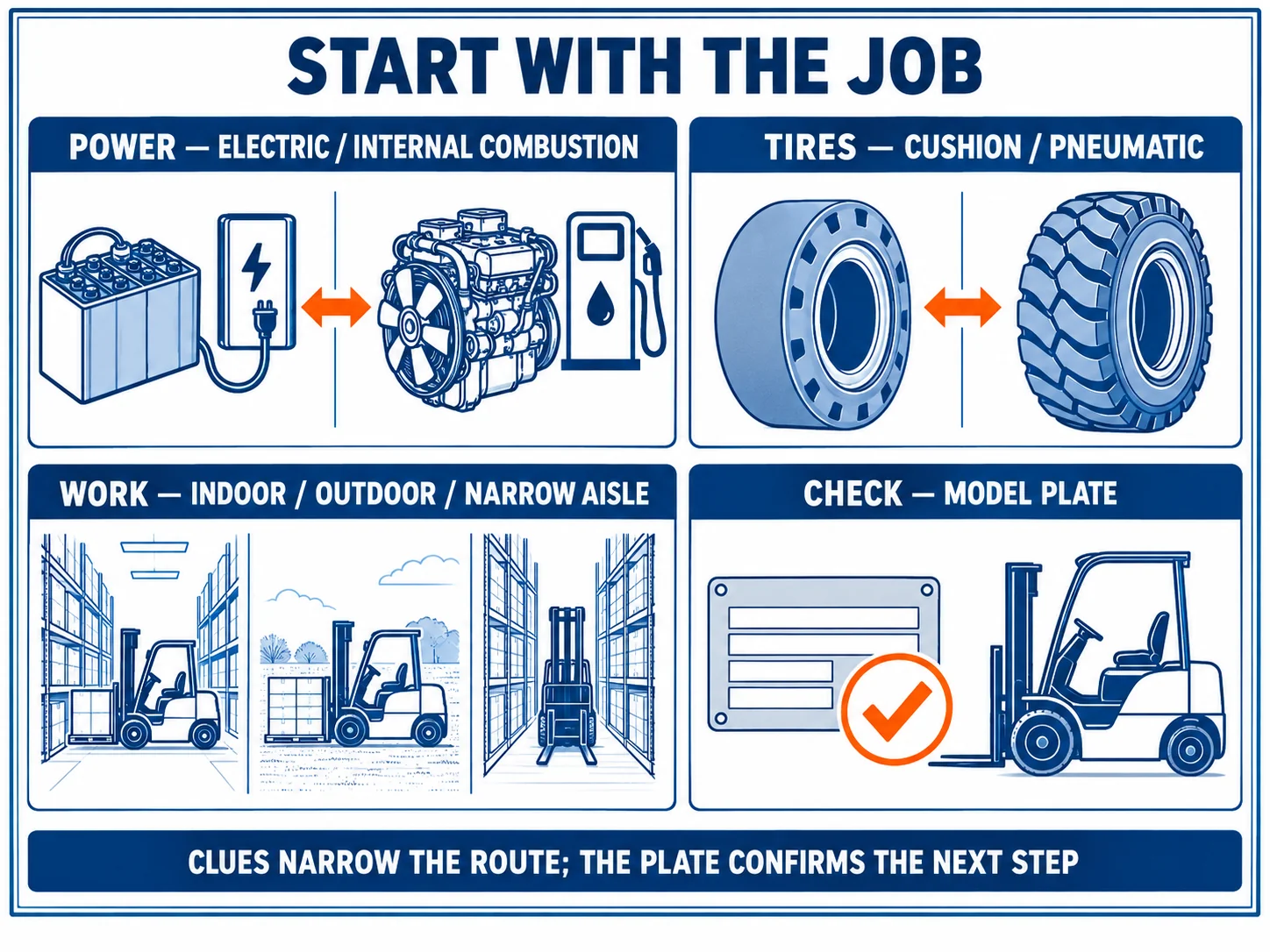
Once the equipment family is clear, use the truck’s power source, tires, and work environment to narrow the likely Toyota model route. These clues are valuable because they describe how the machine is configured and used. They are still clues. A parts buyer should not treat them as a substitute for the complete model and serial details.
Electric versus internal combustion
Electric trucks usually present a battery, charging connection, and electric-drive layout. Internal-combustion trucks may show a fuel system and engine compartment. Toyota’s model navigation uses power-source groupings to separate electric and internal-combustion equipment, which makes power type a practical first filter. It does not identify the exact component version inside a family.
If the power arrangement is not obvious, photograph the data plate and the surrounding truck area. A clean image is more useful than a guess based on noise, color, or a previous owner’s description.
Cushion and pneumatic tire clues
Cushion tires and pneumatic tires point to different operating contexts and appear in separate Toyota product routes. Smooth indoor floors, yard work, tire sidewalls, and ground clearance can help you choose which route to inspect first. Keep the wording cautious: “looks like the pneumatic route” is a sound research note; “this part fits all pneumatic models” is not.
Indoor, outdoor, and specialized work
Work environment adds context when the truck’s body label is incomplete. Narrow aisles, high-bay racks, loading docks, outdoor yards, and short-distance pallet movement suggest different equipment families. The operating context can help you reject an obviously wrong model branch, but it cannot tell you the serial break, option code, or exact attachment configuration.
Practical boundary: Use power, tire, and application clues to reduce the search space. Use the model plate, serial number, and component evidence to decide whether a deeper parts review is justified.
The most efficient workflow records these clues in one line: “electric, four-wheel sit-down, cushion tires, indoor warehouse,” or “internal combustion, pneumatic tires, outdoor yard.” Then attach the exact model designation instead of leaving the description as a free-form guess.
Per Toyota’s model pages, equipment comparison is organized around product attributes and applications. For a parts request, those attributes are filters that lead to the unit identifiers, not a replacement for them.
3. Read the model designation without overreading it
The model designation is the bridge between a broad Toyota forklift models search and a specific reference path. Copy the complete string exactly as it appears on the truck or data plate. Do not shorten it to a capacity number, rewrite its letters from memory, or treat the model code as if it were a component part number.
Model family versus complete unit identity
A model designation can point you toward a product family, comparison page, or parts diagram. It normally does not capture every option on a truck. Serial breaks, mast choices, attachments, tire arrangements, and regional variations can change what needs checking next.
When a model code is only a starting point
Stop the model-only search when:
- The plate is partly unreadable or the first character is uncertain.
- The truck has a capacity sticker but no confirmed model designation.
- A search result shows a similar code with a different power or tire arrangement.
- The requested component is connected to the mast, carriage, hydraulics, steering, brakes, or attachment.
- The available reference does not state the same model or serial range.
These 5 conditions are a stop signal, not a ranking of model families.
Toyota Forklifts describes model numbers as structured identifiers for equipment information, but a model designation does not replace the unit’s complete record. These 5 conditions are practical stop signals: when one appears, keep the candidate model visible and obtain the missing identifier before treating the reference as applicable.
In those cases, keep the candidate model visible and mark the missing field. A transparent unknown is more useful than a confident but unsupported match.
Regional and configuration limits
Toyota’s online model pages help explain current family structure and product attributes. They do not create one universal model list for every country, year, or option combination. For an older or imported truck, preserve the original spelling and collect the data-plate image before translating the name into a newer family.
Pair the model designation with the complete serial number and configuration details that affect the requested component. That keeps model research connected to a verifiable parts conversation.
Worth a second look
Once the Toyota model is clear, the next step can stay practical: fleet maintenance managers can ask Kingstream about forklift parts sourcing for OEM-compatible forklift parts and a fast quotation from a single-source supplier covering major brands.
Glossary
Model designation: The complete machine identifier shown on the truck or data plate and used to select a reference family.
Serial break: A change point in production or configuration where the correct reference or part may differ.
Model clue, not fitment proof: A model code can narrow the search. It should not be the only evidence used to approve a replacement part.
4. Confirm the data plate and complete serial number
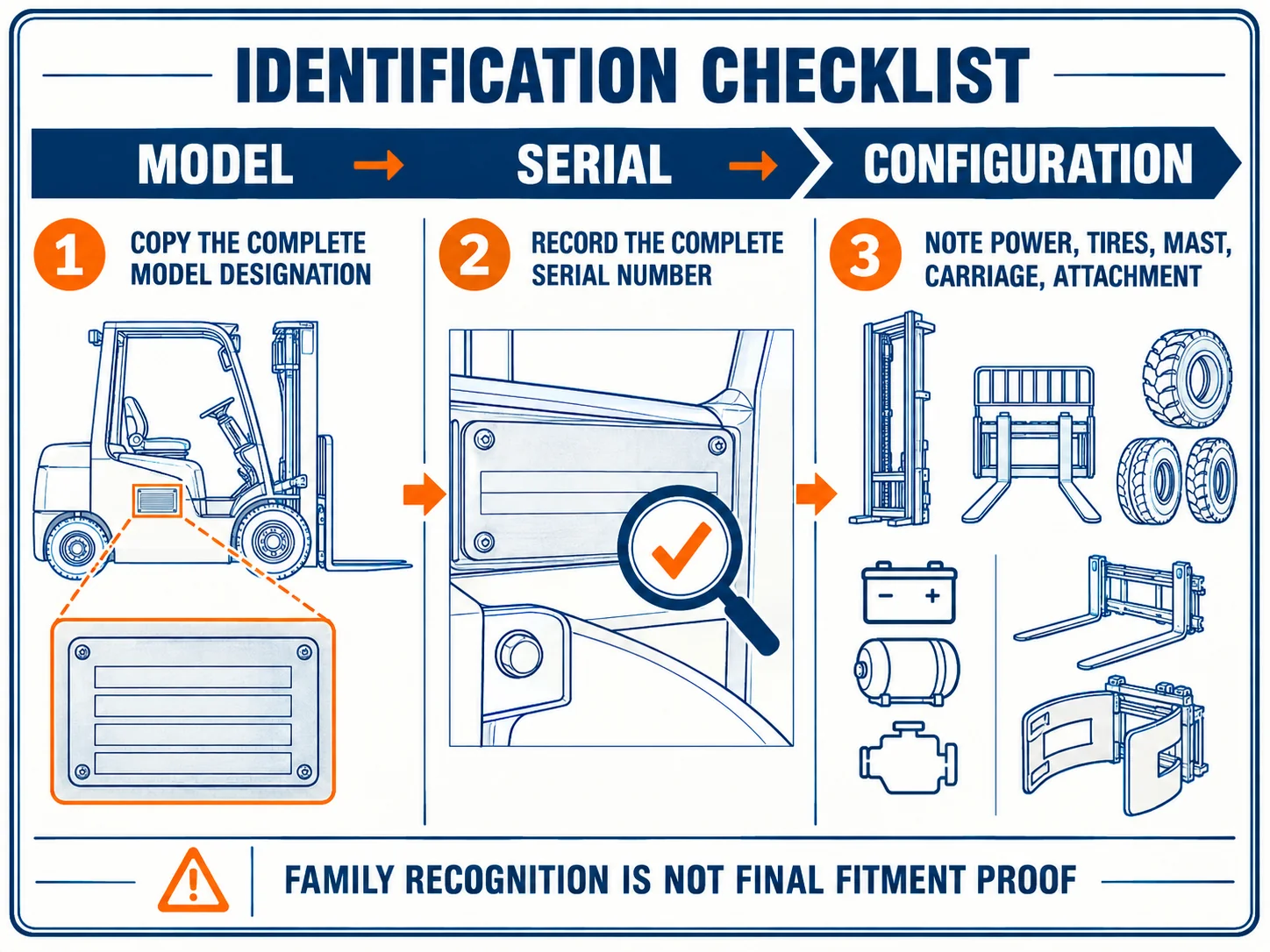
The most useful identification packet contains the model designation and the complete serial number from the same Toyota truck. Start with a readable data-plate photo, then type the details into the request. If one character cannot be confirmed, mark it as unknown. Do not fill the gap from a similar online listing.
What to photograph or transcribe
Take a straight photo in good light. Keep the full plate in frame, including labels around the model and serial fields. Send the original image even after making a typed copy. A second person can then compare the transcription with the physical plate instead of trusting a retyped string.
Record:
- The complete model designation, including every letter and number.
- The complete serial number, including prefixes, suffixes, spaces, or separators.
- The power type and tire arrangement when visible.
- The mast, carriage, and attachment configuration if the requested part is connected to them.
- The component label, old part number, connector, mounting face, or clear photos when available.
Why the serial number changes the next step
The model points to a family. The serial number narrows the truck-level lookup. Toyota’s parts and service material treats accurate machine identifiers as part of the process for locating relevant equipment information, so the serial number should be treated as a buyer input rather than optional background.
This matters most when the same family spans different years, options, or component revisions. A generic search result may look close while still belonging to another truck record. If the serial is missing, the correct action is to request a lookup or obtain a clearer plate, not to approve a part from a broad family label.
Extra configuration details for lift-system parts
For mast, carriage, hydraulic, steering, brake, electrical, or attachment-related requests, add photographs from more than one angle. Show the component in place before removal when safe. Include the mounting face, hose or connector position, stamped number, and any visible option that could change the catalog branch. These details are evidence for a later review. They are not a reason to invent a measurement or universal specification.
The identification packet is complete enough for the next conversation when another person can answer 3 questions without guessing: Which Toyota family is this? Which exact unit is it? Which component or configuration is being discussed?
Toyota’s parts and service guidance makes accurate machine identification part of the information path for equipment support. The practical test is the 3 questions stated above: which family, which exact unit, and which component or configuration. If one answer is missing, the next action is evidence collection, not a guessed part selection.
Data-plate warning: A serial number copied from a different truck, sales listing, or old quotation is not evidence for the unit in front of you. Use the identifier physically tied to this machine.
5. Prepare the information for a parts diagram or inquiry
Once the Toyota model family is narrowed down, prepare the information needed to check a diagram or review a replacement request. Show what you know, what you observed, and what still needs supplier confirmation. Do not present the family label as a final compatibility answer.
| Information | Buyer should provide | Supplier should confirm |
|---|---|---|
| Machine identity | Complete model designation and serial number | The correct catalog or diagram branch |
| Power and equipment type | Electric or internal combustion, sit-down or warehouse equipment | Whether the reference matches that equipment route |
| Configuration | Tire arrangement, mast, carriage, attachment, and visible options | Whether the configuration changes the requested part |
| Component evidence | Old part number, label, photos, connector, mounting face, or measured location | Exact part number, supersession, and fitment status |
| Commercial details | Quantity and destination requirements | Current price, availability, and lead time at quotation |
The table separates ownership. A buyer supplies truck identity and component evidence. A supplier confirms the part reference and commercial details. A public model page cannot confirm stock, price, lead time, or compatibility for an unknown configuration.
Buyer-supplied fields
Send the model and serial as typed text plus the original plate photo. Add the requested component, its installed or removed status, and the system or location, such as brake, steering, hydraulic, engine, electrical, mast, carriage, or attachment.
Supplier-confirmed fields
The supplier should check whether model and serial point to the same reference family, whether a part number has been superseded, and whether the component evidence agrees with the proposed item. Missing fields should be named instead of hidden behind a generic Toyota label.
When to pause before ordering
Pause and request a fitment review when the serial number is incomplete, the model string is uncertain, the component has no readable label, or the truck has a non-standard mast or attachment. These are signals that the next action is evidence collection and confirmation.
Use the existing Toyota parts sourcing page after the identification work is ready for a commercial conversation. This article prepares that step. The procurement page remains the place for parts categories, sourcing, and the final inquiry path.
Handoff checklist
- Machine identity: Model designation copied from the truck or data plate.
- Serial evidence: Complete serial number copied and checked against the photo.
- Equipment clues: Power source, tire arrangement, and equipment family recorded.
- Configuration: Mast, carriage, and attachment details added when relevant.
- Component evidence: Old component number or clear multi-angle photos attached.
- Unknown fields: Clearly marked for supplier confirmation.
Common Toyota model-identification mistakes to avoid
Broad Toyota forklift models searches become unreliable when a weak clue is treated as a final identity. The safest correction is to separate recognition from verification. Recognition tells you which family to investigate. Verification tells you whether the exact unit and component have enough evidence for a deeper parts review.
Searching by color or capacity alone
Paint color, a capacity sticker, or a familiar body shape can suggest a Toyota truck, but none is a complete model designation. Use those details to start the search only. Move to the data plate before copying a model string into a parts request.
Mixing model, series, and serial number
A series name, model designation, and unit serial number are related identifiers with different jobs. A series can describe a group. A model designation narrows the equipment family. A serial number identifies the individual truck record used for a more specific review. Combining them into one shortened label can hide the field that actually matters.
Assuming one family label proves fitment
Similar trucks can carry different masts, carriages, attachments, options, or component revisions. A model-family match is a useful reason to continue researching. It is not a universal compatibility statement. Stop when the evidence no longer covers the requested component.
Use this final check:
- Do I have the complete model designation?
- Did I copy the serial number from this truck?
- Did I record the power and equipment type?
- Did I add configuration details related to the requested component?
- Did I separate what I supplied from what the supplier still needs to confirm?
Do not guess the missing character: A clearly marked unknown can be resolved. A confident transcription based on a similar model can send the entire inquiry down the wrong reference path.
If all five checks are complete, the model research has done its job. You can move to a parts diagram or inquiry with a clearer identification packet, while keeping exact part number, supersession, commercial terms, and final fitment as confirmation-stage questions.
Conclusion
Toyota forklift model research is most reliable when recognition and verification stay separate. Use family, power, tires, and application to choose a route, then confirm the complete model designation and serial number. Add configuration and component evidence before requesting a diagram or supplier fitment review. If an identifier is incomplete, pause and collect the missing evidence.
References
- Toyota Forklifts. (n.d.). New forklifts and lift trucks. Toyota Material Handling. https://www.toyotaforklift.com/lifts
- Toyota Forklifts. (n.d.). Compare forklifts and forklift models. Toyota Material Handling. https://www.toyotaforklift.com/compare
- Toyota Forklifts. (n.d.). Parts and service. Toyota Material Handling. https://www.toyotaforklift.com/parts-and-service
- Toyota Forklifts. (2026, March 16). How to read Toyota forklift model numbers. Toyota Material Handling. https://www.toyotaforklift.com/resource-library/blog/toyota-products/how-to-read-toyota-forklift-model-numbers
- Toyota Forklifts. (n.d.). 7 different types of forklifts and classifications. Toyota Material Handling. https://www.toyotaforklift.com/resource-library/blog/toyota-products/forklift-types-and-classes
Last reviewed and updated: September 2026. Author: Kingstream team. For tailored guidance, contact our team.